Back to all products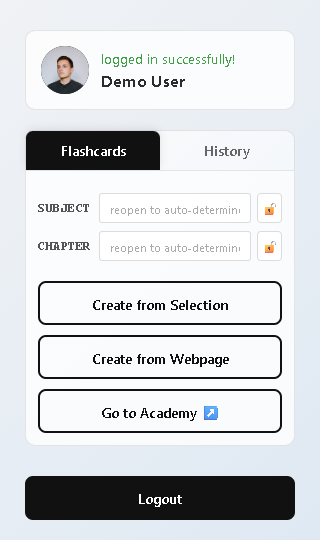
Web Learning Companion
Transform your web browsing into a powerful learning experience!
Great learning material is everywhere on the web... wiki, blog posts, documentation, research papers, tutorials. But turning them into personal notes is manual work. And remembering where you found that information is even harder. Web Learning Companion changes that. Install the browser extension, browse any website, and with one click convert entire pages or selected text into organized flashcards. AI automatically extracts key concepts, preserves images and formatting, handles code snippets and mathematical equations, and syncs everything to your Binapani Academy account. Organize by subject and chapter, track your creation history, and start practicing immediately.
Promo Video
A quick look at Web Learning Companion
The Challenge
What we set out to solve
Great learning material is everywhere—blog posts, documentation, research papers, tutorials. But turning that content into usable flashcards or questions usually means manual copying and reformatting.
And when the content includes code snippets or mathematical formulas, it becomes even more time-consuming and error-prone.
Our Solution
How Web Learning Companion helps
Web Learning Companion lets you capture any webpage with a single click.
AI automatically extracts key concepts and converts them into structured flashcards and questions.
Images, formatting, code blocks, and mathematical equations are preserved accurately.
Organize by subject and chapter, track your creation history, and everything syncs seamlessly to your Binapani Academy account—ready for review, practice, and revision.
How It Works
A simple, streamlined process
1
Install the browser extension and login with your Binapani Academy credentials
2
Browse any website with valuable content—blog posts, documentation, research papers, tutorials
3
Choose to capture the entire webpage or just select specific text you want to learn
4
AI automatically extracts key concepts and generates structured flashcards with images, formatting, and equations preserved
5
Organize by custom subject and chapter names, and track your creation history from the last 7 days
6
Access your generated flashcards on Binapani Academy for practice and spaced repetition
YouTube Shorts
Web Learning Companion Short
Key Features
Everything you need, nothing you don't
Smart Flashcard Generation
Convert any webpage content into study flashcards with one click—works with full pages or selected text
Rich Content Capture
Preserves images, formatting, LaTeX equations, and code blocks accurately during flashcard creation
Custom Organization
Define subject and chapter names for better organization, with option to lock values across multiple websites
Task History Tracking
View your flashcard generation history from the last 7 days with real-time status updates
Seamless Integration
Syncs directly with your Binapani Academy account—access flashcards immediately for practice
Secure & Private
Only accesses current tab when you choose to create flashcards, with secure local authentication
Watch More Videos
Demos, dev vlogs, and walkthroughs
Dev Vlog
Webpage to Flashcards with Chrome Extension
Who it's for
Designed for real-world learning
Best for
Students, Professionals, Researchers, Learners
Key feature
One-click flashcard creation from any webpage—turns browsing into studying
Ready to get started?
Join thousands of learners and educators already using Web Learning Companion.